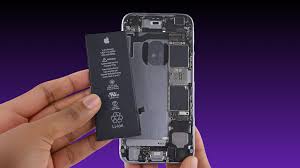
If you’ve recently noticed your iPhone losing battery much faster than usual, you’re not alone. One of the most common questions Apple users ask is, “Why is my iPhone battery draining so fast?” Battery performance naturally changes over time, but rapid battery drain can also be caused by software settings, background activity, aging hardware, or environmental conditions.
Modern iPhones are designed to deliver excellent battery life, allowing users to browse the web, stream videos, play games, make calls, and use apps throughout the day. However, when the battery begins draining unusually fast, it can become frustrating and interfere with daily activities.
Fortunately, fast battery drain is often caused by issues that can be identified and resolved without replacing the device. In some cases, simple adjustments to settings or usage habits can significantly improve battery life. In others, the battery itself may have reached the end of its lifespan and require replacement.
This guide explains the most common reasons why an iPhone battery drains quickly, how to diagnose the problem, practical solutions to extend battery life, and when it may be time to replace the battery.
How iPhone Batteries Work
Every iPhone uses a rechargeable lithium-ion battery.
Lithium-ion batteries are popular because they:
- Charge quickly
- Hold a large amount of energy
- Last through hundreds of charging cycles
- Deliver consistent performance
However, all rechargeable batteries gradually lose capacity over time. As they age, they store less energy and may require more frequent charging.
Battery aging is normal and happens regardless of how carefully the device is used.
Common Reasons Your iPhone Battery Is Draining Fast
Battery Aging
One of the most common causes is a worn-out battery.
As batteries age, they lose their ability to hold a full charge.
Signs include:
- Short battery life
- Unexpected shutdowns
- Slower performance
- Frequent charging
Checking your battery health can help determine whether aging is the primary cause.
Background App Activity
Many apps continue working even when you’re not actively using them.
Examples include:
- Social media apps
- Navigation apps
- Messaging services
- Cloud storage applications
Continuous background activity increases battery consumption.
Limiting unnecessary background refresh can improve battery life.
High Screen Brightness
The display is one of the biggest consumers of battery power.
Keeping brightness at maximum throughout the day significantly increases energy usage.
Using automatic brightness or manually reducing brightness can noticeably extend battery life.
Location Services
GPS functionality requires considerable power.
Apps that constantly access location information may cause rapid battery drain.
Examples include:
- Maps
- Weather apps
- Fitness tracking
- Ride-sharing applications
Limiting location access to only necessary apps helps conserve battery.
Push Notifications
Frequent notifications wake the screen and activate background processes.
Apps that generate constant notifications may contribute to increased battery usage.
Disabling unnecessary notifications can improve battery performance.
Poor Cellular Signal
When your iPhone struggles to maintain a cellular connection, it works harder to locate nearby towers.
This increased activity can quickly drain the battery.
Users often notice faster battery drain in:
- Rural areas
- Underground locations
- Buildings with poor reception
Connecting to Wi-Fi when available can reduce cellular power usage.
Software Updates
Following a major iOS update, temporary battery drain is fairly common.
The system may perform tasks such as:
- Indexing files
- Optimizing photos
- Updating background data
Battery performance often returns to normal after several days.
Outdated Applications
Older versions of apps may contain bugs that consume excessive battery power.
Keeping applications updated helps improve efficiency.
Excessive Gaming
Mobile games require significant processing power.
High-performance games often use:
- Bright displays
- Powerful graphics
- Internet connectivity
- Audio systems
Extended gaming sessions naturally consume battery more quickly.
How to Check Battery Health
Apple provides a built-in Battery Health feature.
Navigate to:
Settings → Battery → Battery Health & Charging
Key information includes:
Maximum Capacity
This percentage indicates how much capacity remains compared to when the battery was new.
Peak Performance Capability
This section shows whether the battery can support normal device performance.
If maximum capacity is significantly reduced, replacing the battery may improve battery life and performance.
Practical Ways to Improve iPhone Battery Life
Lower Screen Brightness
Reducing brightness decreases power consumption.
Enable Auto-Brightness
Automatic brightness adjusts display intensity based on surrounding light.
Use Low Power Mode
Low Power Mode temporarily reduces background activity and extends battery life.
Disable Background App Refresh
Many apps don’t require continuous background updates.
Disabling unnecessary background refresh reduces battery usage.
Limit Location Services
Choose “While Using the App” instead of “Always” whenever possible.
Update iOS
Apple frequently releases software updates that improve battery optimization and fix bugs.
Update Apps
Developers regularly improve application efficiency.
Keeping apps current helps reduce unnecessary battery drain.
Charging Habits That Affect Battery Life
Proper charging habits help preserve long-term battery health.
Avoid Extreme Heat
High temperatures accelerate battery degradation.
Use Certified Chargers
Quality charging accessories help protect battery performance.
Avoid Frequent Full Discharges
Lithium-ion batteries perform best with partial charging cycles.
Enable Optimized Battery Charging
This feature slows charging near 100% when appropriate to reduce battery aging.
Good charging habits contribute to longer battery lifespan.
Apps That Commonly Consume Battery
Some categories naturally require more power.
These include:
- Video streaming
- Navigation
- Social media
- Gaming
- Video editing
- Camera applications
Monitoring battery usage helps identify problematic apps.
Navigate to:
Settings → Battery
This screen displays battery usage by application.
Environmental Factors
Temperature affects battery performance.
Cold Weather
Extremely cold temperatures may temporarily reduce battery performance.
Hot Weather
Excessive heat permanently accelerates battery aging.
Keeping your iPhone within recommended operating temperatures helps maintain battery health.
When Battery Replacement Is the Best Option
Sometimes settings adjustments are not enough.
Battery replacement may be appropriate if:
- Battery health is significantly reduced.
- The phone shuts down unexpectedly.
- Daily battery life becomes unacceptable.
- Charging frequency becomes excessive.
Replacing the battery is often much less expensive than purchasing a new iPhone.
Common Battery Myths
Myth: Closing Every App Saves Battery
Reality: Frequently force-closing apps may not significantly improve battery life.
Myth: Charging Overnight Always Damages the Battery
Reality: Modern iPhones manage charging automatically to reduce unnecessary battery wear.
Myth: Fast Charging Ruins the Battery
Reality: Fast charging is designed to operate safely when using compatible accessories.
Myth: Batteries Last Forever
Reality: Every lithium-ion battery naturally degrades over time.
Understanding these myths helps users make better decisions regarding battery care.
Tips for Maximizing Daily Battery Life
To get the most from your battery:
- Keep iOS updated.
- Reduce screen brightness.
- Enable Low Power Mode when needed.
- Turn off Bluetooth and Wi-Fi when not in use.
- Limit background app activity.
- Disable unnecessary notifications.
- Monitor battery usage regularly.
- Avoid exposing your phone to extreme temperatures.
These habits can significantly improve daily battery performance.
Conclusion
If you’re asking, “Why is my iPhone battery draining so fast?”, the answer may involve several factors, including battery aging, background apps, high screen brightness, poor cellular reception, software updates, or power-intensive applications. Fortunately, many battery issues can be resolved by adjusting settings, updating software, and adopting healthier charging habits.
Checking your battery health is one of the best first steps in diagnosing the problem. If your battery has significantly degraded, replacing it can restore much of your iPhone’s original battery life and performance. Otherwise, optimizing your device settings and monitoring app usage can help extend battery life throughout the day.
With proper maintenance and smart usage habits, most iPhone users can enjoy reliable battery performance and extend the lifespan of both their battery and device