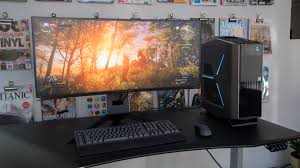
The Alienware Aurora R7 is one of the most recognizable pre-built gaming desktops ever released by Alienware, Dell’s premium gaming brand. Introduced in 2018, the Aurora R7 quickly became popular among gamers, streamers, and content creators thanks to its powerful hardware, compact design, and easy upgrade options. Unlike many gaming desktops that focus solely on appearance, the Aurora R7 combines premium aesthetics with strong performance, making it suitable for both gaming and productivity.
Even years after its launch, many gamers continue using the Aurora R7 because of its solid build quality and ability to handle modern hardware upgrades. While newer gaming desktops feature the latest processors and graphics cards, the Aurora R7 remains a capable machine for 1080p and even 1440p gaming, depending on its configuration and any upgrades installed.
This guide explores everything you need to know about the Alienware Aurora R7, including its specifications, design, gaming performance, upgrade options, advantages, disadvantages, and whether it is still worth buying in 2026.
Overview of the Alienware Aurora R7
The Aurora R7 belongs to Alienware’s well-known Aurora desktop lineup. It was designed as a premium gaming PC that offered excellent performance while remaining relatively compact compared to many traditional gaming towers.
Depending on the configuration, the Aurora R7 was available with different processors, graphics cards, storage options, and memory capacities, allowing buyers to select a system that matched their budget and gaming needs.
Design and Build Quality
One of the strongest features of the Aurora R7 is its unique design.
Premium Appearance
The Aurora R7 features Alienware’s signature futuristic styling with customizable RGB lighting and a distinctive front panel.
Compact Chassis
Despite housing powerful components, the case is relatively compact, making it easier to place on or under a desk.
Durable Construction
The chassis uses sturdy materials designed to withstand years of regular use.
Tool-Less Design
One of the biggest advantages is the tool-less side panel, allowing users to access internal components without needing a screwdriver. This makes upgrades and maintenance much easier than many competing systems.
Hardware Specifications
The Aurora R7 was sold in multiple configurations.
Typical processor options included:
- Intel Core i5-8400
- Intel Core i7-8700
- Intel Core i7-8700K
Graphics card options included:
- NVIDIA GeForce GTX 1050 Ti
- GTX 1060
- GTX 1070
- GTX 1080
- GTX 1080 Ti
Memory options ranged from 8GB to 64GB DDR4, while storage configurations combined HDDs with SATA or NVMe SSDs for improved loading speeds.
Gaming Performance
The Aurora R7 was built primarily for gaming.
1080p Gaming
Most configurations can comfortably play many popular games at high or ultra settings in Full HD.
1440p Gaming
Models equipped with higher-end graphics cards such as the GTX 1080 or GTX 1080 Ti perform well at 1440p.
VR Gaming
Several configurations were marketed as VR-ready, supporting compatible virtual reality headsets.
Productivity Performance
Beyond gaming, the Aurora R7 performs well for productivity tasks.
It is capable of handling:
- Video editing
- Photo editing
- Programming
- Streaming
- Office work
- Content creation
The Intel 8th Generation processors still offer solid performance for many everyday workloads.
Cooling System
Cooling is essential for gaming desktops.
The Aurora R7 includes:
Air Cooling
Entry-level models often shipped with standard air cooling.
Liquid Cooling
Higher-end configurations included liquid CPU cooling for better thermal performance.
Although effective, some reviewers noted that the system fans can become noticeable under heavy gaming loads.
Upgrade Options
One of the reasons the Aurora R7 remains popular is its upgrade potential.
Users commonly upgrade:
RAM
The motherboard supports memory upgrades, allowing improved multitasking and gaming performance.
Storage
Adding larger SSDs is one of the easiest and most beneficial upgrades.
Graphics Card
Many users have upgraded to newer GPUs, although compatibility depends on power supply capacity and physical space.
Processor
Since the system uses Intel’s 8th-generation platform, CPU upgrades are limited to compatible processors from that generation.
Connectivity
The Aurora R7 offers numerous connectivity options.
Front ports typically include:
- USB 3.0
- USB-C
- Headphone jack
- Microphone jack
Rear ports generally include:
- Multiple USB ports
- Ethernet
- Audio outputs
- Display connections
- Wireless networking (on supported models)
These options provide flexibility for gaming accessories and external devices.
Advantages of the Alienware Aurora R7
Strong Gaming Performance
The Aurora R7 continues delivering solid gaming performance with appropriate hardware.
Excellent Build Quality
Its premium construction contributes to long-term durability.
Easy Maintenance
Tool-less access simplifies upgrades and cleaning.
Attractive Design
The unique Alienware appearance remains appealing to many gamers.
Upgrade Flexibility
Users can upgrade RAM, storage, and certain graphics cards to extend the system’s lifespan.
Disadvantages
Although the Aurora R7 offers many strengths, it also has some limitations.
Proprietary Components
Certain internal components are proprietary, making major upgrades more challenging than with a fully custom-built PC.
Fan Noise
Heavy workloads may produce noticeable fan noise.
Older Platform
The Intel 8th-generation platform is no longer the latest technology.
Limited CPU Upgrade Path
Processor upgrades are restricted by motherboard compatibility.
Is the Alienware Aurora R7 Still Worth Buying?
Whether the Aurora R7 is worth buying depends on your needs.
It may be a good option if:
- You find one at a reasonable price.
- It includes a strong GPU.
- You primarily play games at 1080p or 1440p.
- You plan to upgrade storage or RAM.
However, buyers looking for the latest CPUs, PCIe advancements, or easier long-term upgrades may prefer a newer gaming desktop.
Tips Before Buying a Used Aurora R7
If you’re considering a used unit:
Check the Graphics Card
The GPU has the biggest impact on gaming performance.
Verify Storage Health
Ask whether the SSD or HDD has been replaced.
Inspect Cooling
Ensure the cooling system functions properly.
Test Ports
Verify that USB, Ethernet, and display outputs work correctly.
Review Upgrade History
Previous upgrades can significantly affect performance and value.
Who Should Buy the Aurora R7?
The Aurora R7 is suitable for:
- Casual gamers
- Esports players
- Students
- Streamers
- Content creators
- Users looking for an affordable pre-built gaming PC
It may be less suitable for users seeking cutting-edge hardware or maximum upgrade flexibility.
Conclusion
The Alienware Aurora R7 remains one of Alienware’s most successful gaming desktops thanks to its strong build quality, attractive design, and reliable gaming performance. While newer systems offer faster processors and more advanced graphics technologies, the Aurora R7 continues to perform well for many modern games and everyday computing tasks.
Its tool-less design, upgrade-friendly layout, and solid hardware make it a practical choice for gamers who want a dependable pre-built desktop without building a PC from scratch. Although proprietary components and platform age limit some upgrade options, many owners continue extending the system’s lifespan with additional RAM, SSD upgrades, and newer graphics cards.
If you can find an Aurora R7 in good condition at a competitive price, it can still provide excellent value for gaming, streaming, and productivity in 2026.